
6 Kanban Project Management Alternatives for Smooth Planning
Kanban boards have become popular for organizing tasks because they are simple, visual, and easy to start. But as your projects grow, the limitations of a basic board start showing. You may need deeper planning, better workflow automation, clearer reporting, shared team visibility, and tools for tracking time or billing clients. When you reach this point, exploring Kanban Project Management Alternatives becomes important. These alternatives help you upgrade from a simple board to a more structured system that supports your complete work routine.
This blog explains the most reliable alternatives, why they matter, and how tools like Tymora bring additional clarity to your daily project management.
What Is Kanban Board Software?
Kanban board software gives you a visual way to manage tasks through different stages. A Kanban board is built with three main parts. The board shows the entire workflow. The lists represent each stage of the process. The cards represent individual tasks. As cards move across lists, you gain visibility and control over your work.
Kanban software works well for all types of workflows. It can support content planning, teamwork coordination, engineering tasks, client work, personal productivity, and many other processes. The strongest benefit is clarity. You can understand everything at a glance without needing complex menus or many screens.
Why Teams Look for Kanban Project Management Alternatives?
Before choosing an alternative, it helps to understand what today’s teams expect from a project management system. The following points set the foundation and also help you see which tool aligns with your style of work.
- More structure than simple boards: Kanban boards show progress, but they often miss task priority deadlines and project milestones. Teams that handle multiple clients or long running work need more structure so planning becomes predictable.
- Better visibility into time and workload: It becomes difficult to estimate timelines through cards alone. Many growing teams now want a system that connects time tracking with project progress so they can understand their work capacity and plan better.
- Integrated financial and client management: Service-based teams often juggle invoices, contracts, and project tracking in separate tools. When these are not connected, work becomes scattered, and errors appear. A strong alternative should bring the project flow and financial flow closer.
- Fewer tools and more simplicity: Managing too many apps reduces productivity. Teams want a smooth system where they can plan tasks, track hours, check payments, and collaborate without switching tabs all day.
Now that you have a clear context, let us explore the top Kanban Project Management Alternatives that support smoother planning.
6 Kanban Project Management Alternatives
Many teams start with a simple board, but later need more structure or more features. This is where Kanban Project Management Alternatives become helpful. Some tools focus on project tracking. Some focus on automation. Some focus on collaboration. And some combine multiple functions in one place.
The tools in this list offer different strengths. The first option, Tymora, is the most complete because it combines planning, time tracking, invoicing, proposals, client portal, and project management in one workspace. The remaining options are strong choices depending on your workflow, but they often require extra tools for billing or client coordination.
Here are the seven main alternatives explained in detail.
1. Tymora
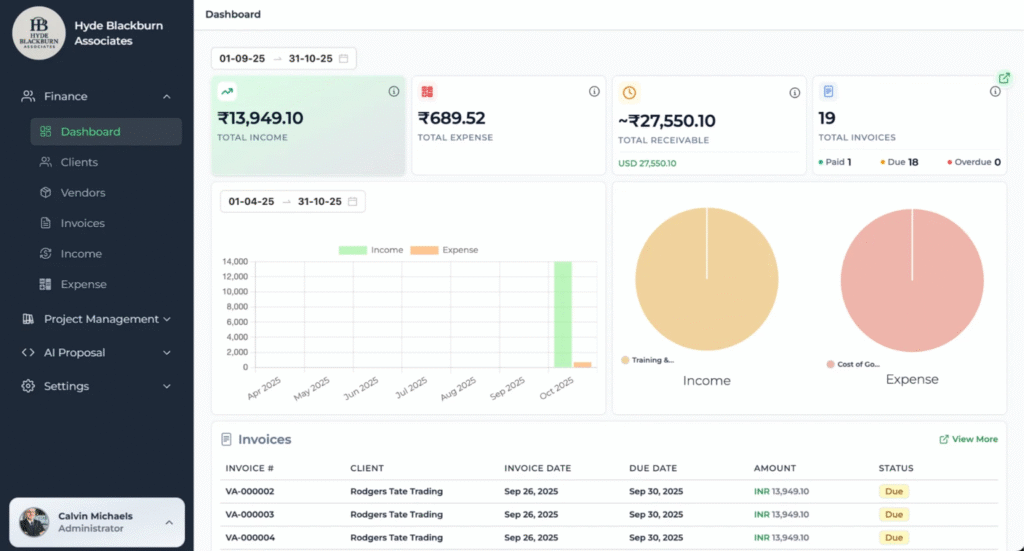
Tymora is an all-in-one workspace designed for freelancers, agencies, and small teams that need more than a basic Kanban board. It brings project management, time tracking, invoicing, client handling, and contract storage together. This makes it a complete alternative to traditional Kanban systems because you get both planning and execution tools in a single workflow.
Features:
- Simple project and task planning
- Drag and drop Kanban-style boards
- Timesheets connected directly to tasks
- Client and contract management
- Invoice and payment tracking
- Dashboard with revenue and project insights
- Workspace accounts for teams
Benefits:
Tymora becomes a central place where planning and billing connect smoothly. You can track hours, assign tasks, generate invoices, and manage client information without juggling multiple applications. This creates a controlled workflow where your project progress, finances, and workload stay transparent.
Use case
A design studio creates projects for each client inside Tymora. As designers log hours on tasks, the system tracks time and relates it to the client. At the end of the month, the studio generates accurate invoices without recreating data from separate apps. This makes billing faster and clearer.
Who can use it
Freelancers, agencies, remote teams, and service professionals who want an easier way to manage planning, execution, and billing in one system.
2. Trello
Trello is a visual task management tool based on boards and cards. It is one of the most familiar board-based systems teams use when they want a clear snapshot of tasks and their statuses. Trello lets you create boards for projects, add lists for stages, and use cards for tasks. While it begins as a simple board, you can enhance it with Power Ups and integrations.
Features
- Custom boards with drag and drop cards
- Labels and checklists
- Automations using built-in rules
- Workspace collaboration
- Basic timeline and calendar views
Benefits
Trello’s simplicity is its strength. Teams can adopt it without training. It helps visualize work and provides basic task management with minimal complexity. Its flexibility means you can make a board for almost any workflow.
Use case
A content team uses Trello boards to track blog topics, drafts, reviews, and publishing stages. Each card represents a blog post and moves through the list until it is published. This keeps the entire team aligned without formal planning rituals.
Who can use it
Freelancers, agencies, remote teams, and service professionals who want an easier way to manage planning, execution, and billing in one system.
3. Asana
Asana is a collaborative project management tool that gives teams multiple ways to plan and track work. It supports boards similar to Kanban but also includes list views, timelines, calendars, and dependencies. Asana aims to help teams plan work in a structured way and keep multiple contributors aligned.
Features
• List, board, timeline, and workflow builder
• Custom automation
• Project templates
• Task dependencies
• Reporting and workload monitoring
Benefits
Asana brings clarity to work by giving teams a place to document tasks, deadlines, and progress. You can see how tasks connect to bigger goals and how delays in one task affect others. This makes planning more thoughtful and less reactive.
Use case
A product team uses Asana to plan a new feature rollout. They map tasks in a timeline, assign dependencies, and monitor progress in daily standups. The team can adjust plans without losing track of milestones.
Who can use it
Mid-size teams, agencies, and companies with ongoing projects that require coordination.
4. ClickUp
ClickUp is an all-inclusive project management and productivity platform that supports many work styles. It includes list views, boards, timelines, docs, goals, and automation. ClickUp lets teams customize workflows and connect every part of their project in a flexible way.
Features
• Multiple project views
• Task templates
• Goals and milestones
• Docs and wikis
• Built-in time tracking
• Automation
Benefits
ClickUp helps teams build workflows that match their style instead of forcing them into one template. You can use Kanban boards when they make sense or switch to timeline or list views for detailed planning. This flexibility makes it a powerful Kanban Project Management Alternative.
Best for
Teams that want customization and multiple project perspectives in one tool.
Use case
A startup organizes all product tasks, team goals, and engineering tickets in ClickUp. Depending on the audience, the team views work in boards, timelines, or list forms. This adaptability helps technical and non-technical teams work side by side.
5. Jira
Jira is a project and issue tracking tool designed for software development teams. It supports Scrum, Kanban, and hybrid methods with advanced configuration for releases, sprints, epics, and backlogs. Jira gives teams the ability to break work into tracked pieces and monitor progress with detailed reporting.
Features
• Sprint planning and backlog management
• Custom workflows
• Advanced reporting
• Developer tool integrations
• Roadmaps
Benefits
Jira brings strong process control. Teams can plan releases, track issues, and view progress at multiple levels. The tool supports complex dependencies and helps developers stay coordinated.
Best for
Software engineering teams and product groups that need deep planning and reporting.
Use case
A development team uses Jira to break planned work into epics and user stories. They hold sprint planning meetings to assign tasks, track blockers, and ensure timely deliveries.
6. Notion
Notion is a flexible workspace that combines note-taking, database functions, and project tracking. Much more than a task board, it lets you build customized planning pages with boards, tables, calendars, and notes. Notion adapts to how your team wants to work instead of forcing a fixed workflow.
Features
• Rich content pages
• Databases with board and table views
• Linked pages and templates
• Collaboration features
• Simple task tracking
Benefits
Notion is ideal when you want customized project systems. You can embed documents, meeting notes, task lists, and status updates all in one space. This turns your planning into a living workspace rather than a static board.
Best for
Creative teams, knowledge workers, writers, and small teams that want a flexible structure.
Use case
A small consulting team creates a Notion page that houses project outlines, task lists, reference materials, and client deliverables together. The team uses a board view connected to a table to plan and update work.
Comparison Table
| All in one end-to-end | Best For | Planning Strength | Ease of Use | Financial Tools |
|---|---|---|---|---|
| Tymora | Freelancers/Agencies | All in one end to end | Simple | Yes |
| Trello | Small teams | Basic boards | Very easy | No |
| Asana | Cross team planning | Strong structure | Medium | No |
| ClickUp | Custom workflows | Highly flexible | Medium | Yes (time) |
| Jira | Software teams | Deep issue tracking | Medium | No |
| Notion | Creative work | Very flexible | Medium | No |
Conclusion
When your team outgrows Kanban, you need tools that give direction, clarity, and control. These Kanban Project Management Alternatives help you plan better, track progress easily, and complete work without confusion. Each option in this list serves different needs, and the right one depends on how your team works.
If you want an all-in-one option that manages projects, tasks, timesheets, invoicing, proposals, and client workflows in one workspace, Tymora is the most complete choice. It helps freelancers and agencies stay organised with less effort.
Start exploring Tymora and see how it simplifies your workflow.
1. What are Kanban Project Management Alternatives, and why do teams look for them?
Kanban Project Management Alternatives are other methods or tools that help teams plan, track, and deliver work without relying only on a visual Kanban board. Teams explore these options when they need more structure, more automation, or deeper project visibility. Some teams outgrow simple task boards as their workload becomes complex. Alternatives offer features like timelines, workflows, sprint cycles, workload insights, and reporting so teams can manage projects with more clarity.
2. Are Kanban Project Management Alternatives better for large teams?
Large teams often gain more control when they switch to Kanban Project Management Alternatives because they get features that support collaboration, workload distribution, and multi-step planning. A simple Kanban board can feel limited when teams manage cross-functional work or long-running projects. Alternatives provide scheduling tools, multiple views, built-in communication spaces, and reporting that helps large groups stay aligned. The choice depends on how much structure the team needs as they scale.
3. Do Kanban Project Management Alternatives help small teams or freelancers?
Small teams and freelancers also benefit from Kanban Project Management Alternatives because they offer clearer planning, easier scheduling, and better progress visibility. Some tools feel heavy for small groups, but many alternatives keep things simple while adding features like time tracking, simple automation, file storage, or client collaboration. These additions help freelancers manage clients and deadlines even when the project workload grows.
4. How do Kanban Project Management Alternatives improve productivity?
Kanban Project Management Alternatives improve productivity by giving teams more ways to organize work. Instead of relying only on cards moving between stages, teams can use timelines, calendars, task lists, automations, and custom workflows. These options help them see bottlenecks earlier and reduce confusion. The clarity gained from these tools encourages faster decisions and smoother execution.
5. Which features should I look for when choosing Kanban Project Management Alternatives?
You should look for clear task organization, workflow customization, time tracking, collaboration options, automation, and reporting. A good alternative makes project tracking easier without adding complexity. It should support your team’s style of work and offer enough visibility to manage tasks with confidence. The best option is the one that simplifies your daily planning and reduces manual efforts.
6. Are Kanban Project Management Alternatives suitable for remote teams?
Remote teams benefit a lot from Kanban Project Management Alternatives because these tools offer shared visibility and help everyone stay aligned even when working across locations. Features like real time updates, file sharing, and progress summaries create a single place for teamwork. This keeps the workflow smooth and ensures that every team member knows what to do next. When remote work grows, these alternatives help maintain control and consistency.
What's inside?
Categories
Customer Success Stories
See how agencies and freelancers are transforming their businesses with Tymora
Tymora has completely transformed how I manage my freelance business. From invoicing to tracking expenses, everything is streamlined and effortless.

Monowar Iqbal Layek
Freelancer
Managing my freelance work is so much easier with Tymora. Invoicing is fast, expense tracking is simple, and I feel more organized than ever.

Sandeep Acharya
Freelancer
Tymora made managing my freelance projects and finances seamless. The platform is intuitive, and support is always responsive and helpful.

Samsur Rahaman
Automation Framework Architect