
Smart Time Tracking Software That Auto Generates Invoices
Smart time tracking matters more today because most freelancers and small agencies work in a fast environment. You shift between clients, handle multiple tasks on the same day and try to stay responsive to everyone. While doing this, time tracking becomes something you try to manage mentally. You trust your memory. You hope you remember how many hours a task took. You promise yourself you will update the spreadsheet later but you rarely do it consistently. At the end of the week, you sit down and try to piece everything together. This creates frustration and doubt because you are no longer sure if your hours are accurate.
This is the main reason more professionals search for a time tracking software that auto generates invoices. They want a smooth system that captures work accurately and converts it into invoices automatically. The idea is simple. A smart tool should let you track time with ease, organize it by client and project and send a clean invoice without manually entering the same information again. When this process becomes automated, your workflow feels more stable and predictable.
Freelancers want clarity. Agencies want consistency. Smart time tracking solves both. It gives you one place to track time, manage projects, prepare invoices and keep a steady record of your work. It creates a system that feels reliable, especially during busy months when you cannot afford to lose track of anything.
Why traditional time tracking creates problems?
Many people begin with spreadsheets because it feels easy. You create a sheet, add rows for each client and fill in hours whenever you remember. This works only at a very small scale. As soon as your workload grows or when you have to manage more clients, manual tracking quickly becomes a burden. You forget to log hours. You estimate instead of recording accurately. You make small mistakes. Invoicing becomes stressful because you need to collect all time logs and re enter them in a billing tool.
Traditional methods also create confusion for clients. When an invoice contains unclear descriptions or missing hours, clients ask questions that delay payments. You then spend extra time explaining work that should have been clear from the start. This cycle wastes energy and affects the trust your clients have in you. What starts as a simple spreadsheet ends up affecting your business flow.
Modern freelancers need solutions that reduce manual effort. That is why tools that combine time tracking with automatic invoicing are becoming essential. They give you a process that stays consistent every week without extra effort.
What smart time tracking means in 2025?
Smart time tracking is not just a digital timer. It is a connected system that understands the structure of your work. A good platform lets you track time in real time but also supports manual entries for days when you forget to start a timer. It organizes everything under clients and projects so you always know where your hours went. When a time tracking software that auto generates invoices joins these features together, it allows your logs to flow into your billing process smoothly.
Modern tools focus on clarity. They give you clean dashboards, simple workflows and accurate time records. They help you maintain strong relationships with clients because your work becomes more transparent. Clients appreciate detailed logs. They like knowing what tasks took time and why those tasks mattered. Smart tracking helps you present your work professionally without spending extra time preparing reports.
In 2025, smart time tracking means more than logging hours. It means managing your business in a structured way. You focus on work instead of managing the work. This difference brings peace of mind because your system becomes dependable.
Why automation matters for freelancers and agencies?
Automation is valuable because it removes repetitive steps from your workflow. You still stay in control but you no longer have to perform the same actions every week. When your time logs automatically become invoices, your billing cycle becomes faster. You do not need to rewrite descriptions or calculate totals. Everything appears in the right place.
Accurate logs also protect your income. Many freelancers undercharge without realizing it. Small tasks like communication, small revisions or file preparation often get missed. When your timer runs while you work, these minutes are captured. Over weeks and months, this creates a noticeable difference in your earnings. Automation helps you avoid underbilling and reinforces the value of your time.
Agencies benefit even more because team members track time in the same workspace. A good time tracking software that auto generates invoices collects every log and keeps all projects organized. When it is time to invoice clients, you simply review and approve. This saves hours of administrative work and keeps your agency running smoothly.
Features you should expect from a time tracking software that auto generates invoices
When choosing a tool, look for features that support your workflow instead of complicating it. You want a system that feels intuitive on the first day and continues to feel dependable as your business grows.
- A strong timer should allow instant tracking with a single click. It should attach entries to clients and projects without confusion. You should be able to edit entries whenever needed because mistakes happen. The system should also support manual time entries for days when timers are not practical.
- A good platform also supports multiple billing rates. Freelancers often charge different rates for different clients or even different tasks. This flexibility must stay built into the system. When invoices are generated automatically, the tool should apply these rates without requiring manual adjustments.
- Expense logging is another helpful feature because many projects include reimbursable costs. When your invoices include both time and expenses, your billing becomes complete and professional. A time tracking software that auto generates invoices should present all these items in a clear format that clients understand easily.
Finally, look for clean invoice templates that feel simple and readable. Clients should understand what they are being billed for without extra explanation.
Automation strengthens accuracy and income
One of the biggest advantages of smart time tracking is the removal of guesswork. When you track time accurately, your billing becomes more precise. Clients appreciate transparency because it shows you respect their expectations. You also gain confidence in your own records because the data comes directly from your logs.
Accurate logs reveal how your time is distributed across tasks and clients. This helps you understand which projects are profitable and which ones require adjustments. It also helps you improve your planning. When you know how long tasks actually take, you can set realistic deadlines and avoid overcommitment.
Automation supports this accuracy by removing the manual steps that usually lead to mistakes. If you no longer copy time from one tool to another, you eliminate the chance of missing entries or typing errors. This protects your earnings and builds a more consistent work routine.
How the workflow feels with a connected system?
When you use a time tracking software that auto generates invoices, your workday becomes smoother. You start your day by opening your workspace and starting a timer for your first task. You work normally and stop the timer when you finish. You move to the next task and start the next timer. As the day progresses, your logs grow automatically under the correct projects. You do not worry about losing track.
At the end of the week, you check your time log. Everything is organized clearly. When you decide to invoice a client, you open the invoicing section and choose the client. The system gathers all relevant time logs and places them inside the invoice. You review the entries, check totals and send it. The entire process takes a few minutes instead of an hour.
This workflow feels calm because nothing is scattered. You do not copy data from spreadsheets. You do not guess hours. You trust the system because everything stays recorded in real time. This reduces mental load and helps you stay focused on creative or technical work instead of administrative work.
Tymora supports this workflow naturally
Tymora brings all these benefits into a single workspace. The platform gives freelancers and small agencies a simple system to track time, manage projects, organize clients, create invoices and understand income through a clean dashboard. The experience stays consistent whether you work alone or manage a small team.
Time tracking in Tymora is straightforward. You start a timer, attach it to a project and continue working. Manual entries are also easy to add when needed. The workflow stays clean because every log connects to the right client.
The invoicing system in Tymora uses your time logs directly. You select the client and the software prepares a complete invoice with accurate totals. It applies your billing rates and includes expenses when relevant. This saves time and reduces errors.
Tymora also supports proposals, contracts, project planning, expense tracking and a client portal. These features work together without overwhelming you. You use what you need and the system remains organized. This is helpful for freelancers who want a reliable foundation for their business and for agencies that want clear visibility over their team.
Read our blog on Smart Ways to Track Client Payments and Avoid Outstanding Invoices
Tips to make the most of your time tracking system
Good tools become even better when paired with consistent habits. Make it a practice to start timers as soon as you begin work. Take a moment each week to review your logs. Use clear task descriptions because they make invoices easier to understand. Set billing rates correctly from the start and follow a fixed invoicing schedule so your income remains steady.
Small habits like these make your system more effective. They help you stay organized and reduce last minute stress when it is time to bill clients.
Benefits of using smart time tracking
Once you use a strong time tracking software that auto generates invoices, you will notice a shift in your business. Your workload feels structured. Your invoices become cleaner and more professional. Clients respond positively because they see transparency. You save hours every month because manual work disappears. Your income becomes more predictable.
These improvements create stability that many freelancers look for. Your business becomes easier to handle. You spend more time doing real work and less time trying to organize it. This sense of order gives you confidence and helps you plan your long term goals more clearly.
Why this is the right moment to upgrade?
The freelance industry continues to grow. More people are working independently and agencies are managing distributed teams. As the workload increases, the need for organized workflows becomes more important. A modern time tracking software that auto generates invoices gives you the foundation you need to stay ahead. It prepares you for higher workloads, more clients and more responsibilities.
Upgrading your system now helps you avoid stress later. A clean workflow improves your relationship with clients. It makes your work day smoother. It keeps your business ready for growth.
How Tymora helps you transition smoothly?
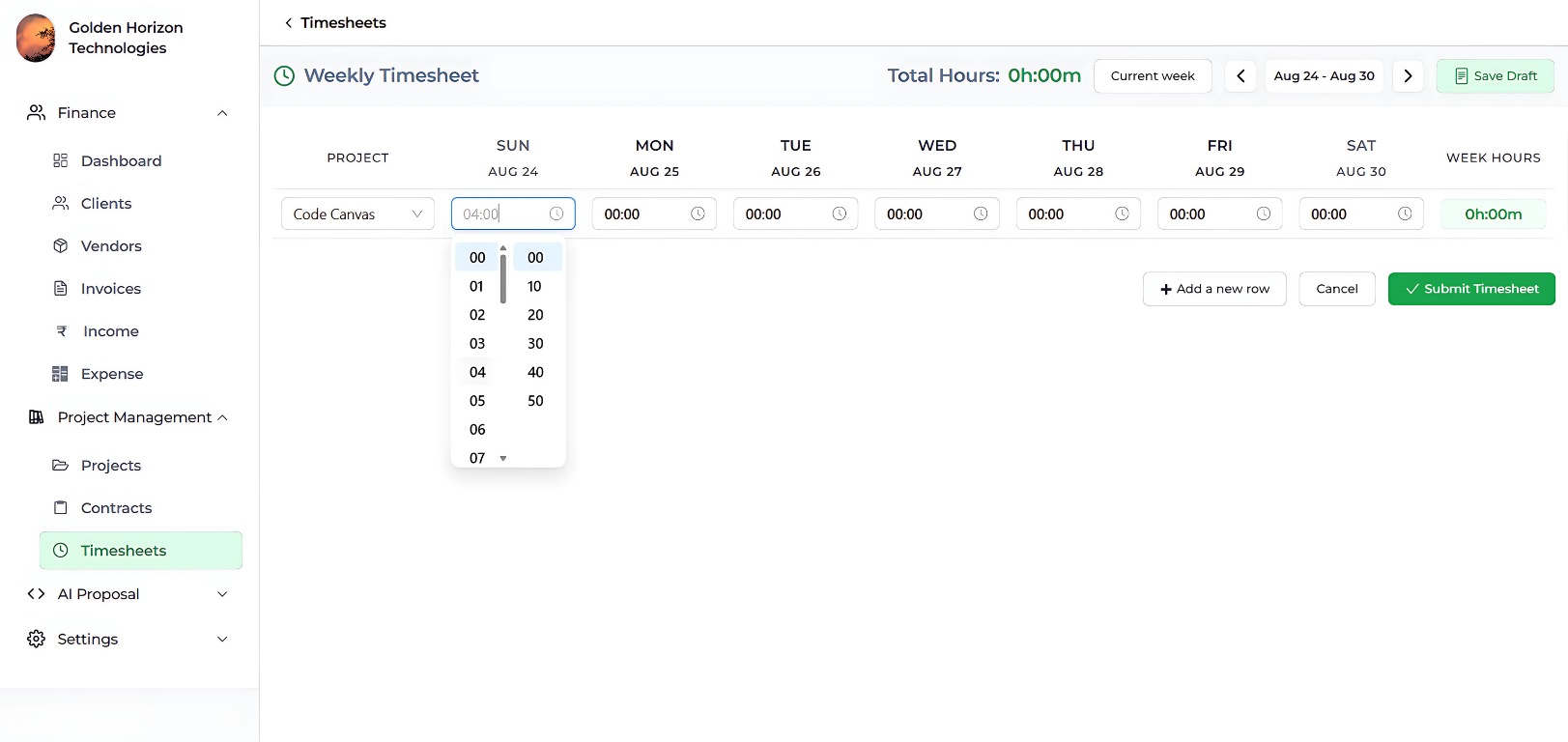
Tymora offers a unified space where you can track time, create invoices, manage clients, plan projects and view business insights without switching tools. This makes your transition easier because you do not need to learn multiple systems. You set up clients, add projects, set billing rates and begin tracking time on the same day.
As your business grows, Tymora grows with you. The features remain simple but powerful. You always know where your time goes and how your invoices are prepared. This clarity helps freelancers and agencies build strong routines.
Final Thoughts
A reliable time tracking software that auto generates invoices gives freelancers and small agencies an easier way to manage their work. It reduces confusion, removes repetitive steps and brings structure to your workflow. When your time logs turn into accurate invoices automatically, you gain confidence in your business and present yourself professionally to clients. Smart time tracking is not just a tool. It becomes a crucial part of your work system. It helps you save time, earn more and work with clarity.
Tymora gives freelancers and small agencies a simple way to manage their work. You can track time with ease, create invoices automatically, manage projects, organize clients and understand your business through a clean dashboard. Everything stays connected so you do not jump between tools. If you want clarity in your workflow and a system that feels dependable every week, try Tymora and experience how a unified workspace improves your day to day work.
1. What is a time tracking software that auto generates invoices?
A time tracking software that auto generates invoices is a tool that records your work hours and converts them into complete invoices without manual entry. It captures your time in real time, organizes it under clients and projects and prepares an invoice with accurate totals and descriptions. This helps you avoid errors and gives you a clear workflow from tracking to billing.
2. How does a time tracking software that auto generates invoices help freelancers?
Freelancers handle many tasks for different clients, so keeping records manually becomes difficult. A time tracking software that auto generates invoices removes guesswork by tracking hours as you work and placing them inside invoices automatically. This makes billing faster, reduces stress at the end of the week and ensures you do not miss small tasks that deserve compensation.
3. Does a time tracking software that auto generates invoices improve transparency for clients?
Yes. When your invoices come directly from time logs, clients can see exactly what you worked on and how long each task took. This clarity reduces back and forth communication and helps clients understand the value of your time. It also builds trust because everything appears consistent and professionally organized.
4. Can small agencies use a time tracking software that auto generates invoices for team members?
Yes. Agencies benefit even more because every team member’s hours get stored in one organized workspace. When it is time to bill a client, the system gathers all relevant logs and prepares a single invoice that reflects the team’s combined effort. This keeps project billing smooth and helps agencies maintain predictable revenue.
5. Does this type of software reduce billing mistakes and missed hours?
Yes. Most billing errors come from manual entries, spreadsheets, forgotten hours or inconsistent notes. A time tracking software that auto generates invoices removes these issues by using real time logs as the source of truth. Since everything is recorded automatically, you avoid missing entries and keep your invoicing accurate every time.
6. Why consider Tymora as your time tracking software that auto generates invoices?
Tymora brings time tracking, invoicing, projects, clients, expenses and contracts into one workspace. This keeps everything connected, which means your time logs flow directly into your invoices without extra steps. The platform gives freelancers and agencies a clean and dependable system that helps them stay organized and work with clarity.
What's inside?
Customer Success Stories
See how agencies and freelancers are transforming their businesses with Tymora
Tymora has completely transformed how I manage my freelance business. From invoicing to tracking expenses, everything is streamlined and effortless.

Monowar Iqbal Layek
Freelancer
Managing my freelance work is so much easier with Tymora. Invoicing is fast, expense tracking is simple, and I feel more organized than ever.

Sandeep Acharya
Freelancer
Tymora made managing my freelance projects and finances seamless. The platform is intuitive, and support is always responsive and helpful.

Samsur Rahaman
Automation Framework Architect