
5 Best Workflow Automation Software for Freelancers

Freelancing was supposed to give you freedom. But instead, you’re juggling client messages, deadlines, invoices, revisions, and follow-ups, all before lunch.
Sound familiar?
That’s the daily chaos most freelancers face. You wake up excited to create, but end up managing. The truth? Manual tasks are silently killing your productivity and your passion.
Here’s the good news:
You don’t have to work harder. You just have to work smarter, with workflow automation software.
Let’s dive into how automation can transform your freelance business, and the 5 best workflow automation software for freelancers that’ll help you finally reclaim your time, energy, and focus.
Why Workflow Automation Works for Freelancers?
Before we jump into tools, let’s talk about why automation matters.
When you’re a solo freelancer or running a small agency, your time is your currency. But if most of it goes into repetitive admin work; like sending follow-up emails, tracking invoices, or organizing projects, you’re burning energy that should be spent on actual billable work.
That’s where workflow automation software steps in.
With the right tool, you can:
- Automate client onboarding
- Schedule recurring invoices and payment reminders
- Set up task workflows
- Auto-send thank-you notes after payments
- Sync everything in one dashboard
It’s like hiring a personal assistant who never sleeps, forgets, or misses a deadline.
What to Look for in the Best Workflow Automation Software?
Not all automation tools are built for freelancers. Many are made for large teams and feel bloated, complex, or expensive.
So, here’s what to look for when choosing your workflow automation software:
- Ease of Use – You shouldn’t need a tech degree to set it up.
- Integration – It should connect with tools you already use (like Gmail, Slack, or Google Drive).
- Flexibility – Scales as your freelance business grows.
- Affordability – You don’t need enterprise pricing for solo work.
- Customization – Tailor it to your exact process.
Now, let’s get into the list of the best workflow automation software for freelancers that tick all these boxes, and more.
1. Tymora
Imagine a platform that handles your invoices, reminders, contracts, proposals, and client follow-ups; automatically.
That’s Tymora, your all-in-one productivity and payment powerhouse.
Why Freelancers Love Tymora
Tymora isn’t just another workflow automation software; it’s built specifically for freelancers and small businesses who are tired of chaos.
Here’s what makes it shine:
- Smart Invoicing Automation – Create and send invoices in minutes. Tymora automatically sends follow-ups for overdue payments and even sends a thank-you note after payment.
- Seamless Proposal Management – Auto-generate and customize proposals, so you can pitch faster.
- Client Contract Automation – Send, sign, and store client contracts; all in one place.
- Expense & Income Tracking – Automatically log and categorize transactions for better financial visibility.
- Reminder System – Set up recurring reminders for clients, deadlines, and payments.
Pain Point Solved
Most freelancers lose money due to delayed payments or missed follow-ups. Tymora removes that anxiety. Once you set it up, it runs your workflow like a backstage crew; quiet, reliable, and always on time.
Why It’s Great
It’s clean, beginner-friendly, and feels like it was built for you. Tymora doesn’t just save time; it gives back peace of mind; something every freelancer deserves.
Best for: Freelancers who want a complete automation system without switching between five different tools.
2. Zapier
If you want a tool that connects everything in your freelance workflow, Zapier is your go-to.
What It Does
Zapier links your favorite apps (like Gmail, Trello, Slack, and Notion) and automates tasks between them. For example:
- Automatically save email attachments to Google Drive
- Create Trello tasks when a new form is submitted
- Send Slack alerts for new client emails
Pain Point Solved
Freelancers often waste hours switching between apps. Zapier acts as the bridge, eliminating manual movement between platforms.
Why It’s Great
Its “no-code” setup means you can automate complex workflows with simple “if this, then that” logic.
Best for: Tech-savvy freelancers who love flexibility and deep integration.
3. ClickUp
If managing multiple clients, tasks, and deadlines is your daily battle, ClickUp can be your project command center.
What It Does
ClickUp combines project management, task tracking, time logging, and automation under one sleek interface. You can:
- Auto-assign tasks
- Trigger reminders when due dates approach
- Auto-update statuses when tasks are completed
Pain Point Solved
When juggling multiple clients, projects can quickly become unmanageable. ClickUp automates repetitive task management, keeping everything organized and on track.
Why It’s Great
It offers powerful templates and integrations, yet remains user-friendly for freelancers and small teams.
Best for: Freelancers managing multiple projects or small agencies collaborating with clients.
4. Notion + Automations
Notion is like a digital brain and with automation tools like Make (formerly Integromat) or Zapier, it becomes unstoppable.
What It Does
You can automate:
- Client onboarding forms
- Project dashboards
- Task updates
- Notifications
Imagine this: When a client fills a form, a new project page auto-generates in Notion, complete with tasks, deadlines, and notes.
Pain Point Solved
Keeping everything in one place often turns messy. With automation, Notion becomes your streamlined workspace that practically runs itself.
Why It’s Great
It’s flexible, visual, and adapts to your exact workflow. For freelancers who love to personalize their setup, this is gold.
Best for: Freelancers who want creative control and organization in one platform.
5. Trello + Butler
For freelancers who prefer a simple, visual layout, Trello is an old favorite. But when paired with its built-in automation tool, Butler, it becomes a productivity powerhouse.
What It Does
Trello uses boards and cards to organize projects. Butler lets you automate:
- Moving cards when due
- Assigning team members
- Sending notifications
- Adding labels or checklists automatically
Pain Point Solved
Manual task tracking eats up time and invites errors. Trello’s visual boards + Butler rules automate progress tracking without you lifting a finger.
Why It’s Great
It’s simple, satisfying, and beginner-friendly. You can visually “see” your workflow run smoothly — without any micromanaging.
Best for: Freelancers who thrive on visual organization and simple task automation.
The Real Power of Workflow Automation for Freelancers
Here’s the truth: workflow automation doesn’t just save you time, it saves your sanity.
By setting up the right systems:
- You stop worrying about overdue invoices
- You stop manually tracking deadlines
- You start focusing on your creative work, the reason you became a freelancer in the first place
When your systems run smoothly, you show up more confidently, communicate more clearly, and deliver work faster. That’s how freelancers evolve into small business owners.
Tymora: The Hero Behind Your Workflow
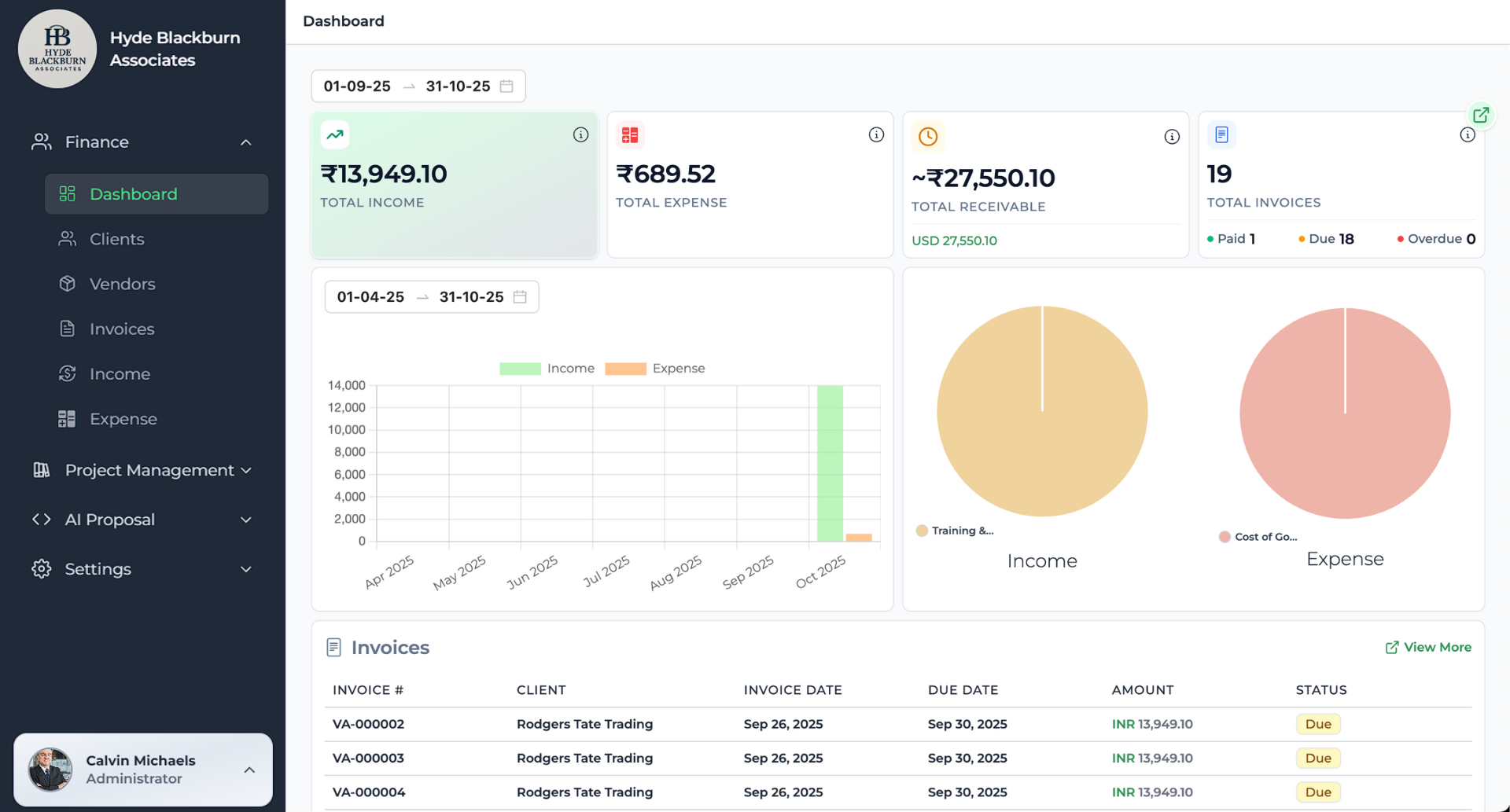
Let’s be honest. switching between invoicing apps, contract tools, and follow-up reminders can be exhausting. That’s why Tymora isn’t just another name on this list; it’s your hero tool.
Tymora brings everything under one roof: invoicing, reminders, proposals, contracts, and expense tracking; all automated.
With Tymora, you can stop chasing clients and start scaling your business without losing your freedom.
Imagine this: You send a proposal, it’s accepted automatically, a contract is generated, the invoice follows, and payment reminders go out — all while you’re sleeping.
That’s not the future. That’s Tymora.
Final Thoughts
If you’ve been feeling like there just aren’t enough hours in the day, you’re not lazy; you’re just doing too much manually.
Automation isn’t about replacing your effort; it’s about amplifying your efficiency.
So, whether you start small with tools like Trello or go all-in with Tymora, every automated workflow gets you one step closer to freedom, the freedom to create, grow, and live the freelance life you dreamed of.
Ready to Supercharge Your Freelance Workflow?
Stop drowning in busywork and start building systems that scale with you.
Try Tymora today; your all-in-one workflow automation software built to simplify your freelance business. Save time, get paid faster, and work on what truly matters your craft.
1. What is workflow automation software and how does it work?
Workflow automation software uses rules and triggers to automatically complete repetitive steps in a process, like sending updates, organizing tasks, or moving files, without manual work.
2. Why do freelancers need workflow automation software?
Workflow automation software for freelancers helps save time by automating follow-ups, approvals, client communication, and project steps, so they can focus on billable tasks instead of admin.
3. Can workflow automation software integrate with tools I already use?
Yes. Most workflow automation software integrates with tools like Gmail, Slack, Trello, Notion, Zapier, and invoicing apps to sync data and run actions across platforms.
4. What are the key features to look for in workflow automation software for freelancers?
Freelancers should look for templates, no-code builders, task triggers, CRM automation, payment reminders, email workflows, and real-time notifications.
5. Is workflow automation software expensive for solo freelancers?
No. Many workflow automation software options offer free or low-cost plans designed for freelancers, with upgrades only if you scale or need premium features.
6. What problems can workflow automation software solve for small service businesses?
It reduces manual errors, speeds up approvals, automates onboarding, ensures deadlines are met, and keeps all workflows consistent for better client delivery.
What's inside?
Customer Success Stories
See how agencies and freelancers are transforming their businesses with Tymora
Tymora has completely transformed how I manage my freelance business. From invoicing to tracking expenses, everything is streamlined and effortless.

Monowar Iqbal Layek
Freelancer
Managing my freelance work is so much easier with Tymora. Invoicing is fast, expense tracking is simple, and I feel more organized than ever.

Sandeep Acharya
Freelancer
Tymora made managing my freelance projects and finances seamless. The platform is intuitive, and support is always responsive and helpful.

Samsur Rahaman
Automation Framework Architect