
A Tool That Converts Timesheets to Invoices Automatically
Your team submitted timesheets for last week. Now you’re opening Excel. Copying hours from Toggl. Calculating what each person should bill. Transferring everything to QuickBooks. Double-checking the math because last month you undercharged a client by $800.
This takes you 3 hours every single week. That’s 156 hours per year spent copying data that a computer should handle in 30 seconds.
Here’s the frustrating part: you’re already paying for time tracking software. You’re paying for invoicing software. But they don’t talk to each other. So you’re the human API connecting them, wasting your Wednesday afternoon on data entry instead of actually running your agency.
You need a tool that converts timesheets to invoices automatically. Track time, approve hours, generate invoice. No copying. No calculating. No Wednesday afternoon wasted.
Why Your Current Setup Is Broken?
Most agencies cobble together 3-4 different tools and wonder why invoicing takes forever. Here’s the typical mess:
Time gets tracked in Toggl or Harvest. Then exported to CSV. Then someone (probably you) opens that CSV and copies hours into Excel to calculate totals. Then those totals get manually entered into QuickBooks or FreshBooks to create the actual invoice. Then you notice Developer B worked 32 hours but you only billed for 23 because somewhere in the copy-paste chain, 9 hours disappeared. Every single transition point is a place where data gets lost, rates get applied wrong, or you just forget to bill for something entirely.
The manual workflow looks like this: Track → Export → Copy → Calculate → Transfer → Create → Double-check → Fix errors.
That’s eight steps when there should be two: Track → Invoice.
What “Automatic” Actually Means (Because Most Tools Lie)
Half the tools out there claim “automatic invoicing from timesheets” when what they really mean is “slightly faster manual invoicing.”
Real automatic timesheet to invoice conversion means you track time, approve the timesheet, and the invoice appears. Done. No copying. No calculating. No filling out invoice fields. The computer does everything between “approved timesheet” and “invoice ready to send.”
Here’s what genuine automation from timesheets to invoices includes. The system already knows Developer A bills at $75/hour and Designer B bills at $90/hour. You set those rates once. The system remembers them forever. When Developer A logs 32 hours on Project X, the system knows that’s $2,400 for Client X’s invoice. You never touch a calculator.
The approval workflow happens inside the same system. Developer A submits their timesheet. Manager reviews it in 30 seconds and clicks “Approve.” Those approved hours immediately become available for invoicing. The system already knows which client, which project, which rates.
You click “Generate Invoice” for Client X. The system pulls all approved hours from that client’s projects, applies everyone’s billing rates, does all the math, formats everything professionally, and hands you a finished invoice. Your job is just reviewing it and hitting send.
If you’re copying data between systems, it’s not automatic. If you’re calculating totals yourself, it’s not automatic. If you’re filling out invoice fields manually, you’re using the wrong tool.
How Tymora Actually Converts Timesheets to Invoices?
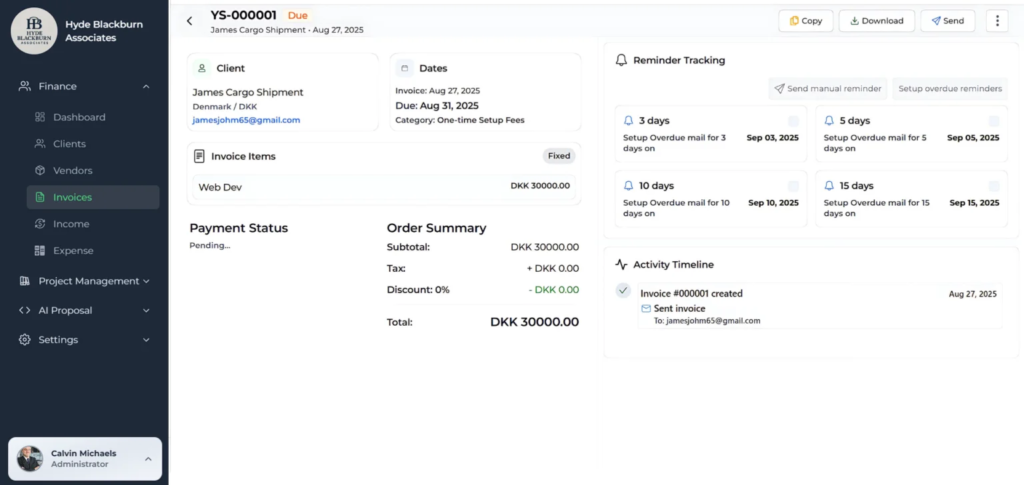
Tymora was built by someone who got tired of wasting Wednesday afternoons on timesheet processing. The entire platform exists to solve this one specific problem: converting timesheets to invoices automatically.
Your team installs the desktop time tracker. It runs quietly in the background tracking actual work time. Not screenshots every 10 minutes like those creepy monitoring tools. Just accurate time tracking with productivity metrics that show actual work patterns.
At the end of the week, each person’s timesheet auto-fills with everything they tracked. They don’t manually enter “Monday 8 hours, Tuesday 7.5 hours.” The system already captured it. They just review for accuracy and click “Submit.” Takes 2 minutes instead of 20.
Now you (the manager) see all submitted timesheets in one dashboard. You’re not comparing Excel files or chasing people for missing hours. Everyone’s timesheet is right there. You review each one, make sure the hours look reasonable, and click “Approve.” For a 10-person team, this takes maybe 15 minutes total.
Here’s where it gets good. You open the invoicing section and click “Generate Invoice” next to Client A. The system looks at all approved timesheets, finds every hour logged to Client A’s projects, applies each team member’s billing rate automatically, calculates the totals, and creates a formatted invoice. Three seconds from click to finished invoice.
You review it quickly (always review before sending), maybe add a note or adjust something minor, and send it to the client. The entire process from “team submits timesheets” to “client receives invoice” takes about 30 minutes for multiple clients.
Compare that to your current 3-hour Wednesday afternoon routine. That’s the power of automatic timesheet to invoice software.
Read our Blog on “Create Invoices in Minutes with Tymora“
Real Example: Before and After
Let’s say you’re running a 10-person development agency. You have 8 active clients. Everyone bills at different rates ranging from $75 to $175 per hour depending on experience. You invoice weekly because cash flow matters.
1. The Old Way (What You’re Probably Doing Now)
- Monday morning: You send a Slack message reminding everyone to submit their Harvest timesheets. Half the team forgets. You send another message Tuesday. Takes 30 minutes of your time spread across two days.
- Tuesday afternoon: You export time data from Harvest. Open Excel. Start copying hours into your timesheet template. Developer A worked 32 hours. Developer B worked 28.5 hours. Designer C worked 24 hours. You’re manually typing all of this. One hour gone.
- Wednesday morning: Now you’re calculating billable amounts. Developer A is senior level, bills at $150/hour. That’s 32 × $150 = $4,800. Developer B is mid-level at $100/hour. That’s 28.5 × $100 = $2,850. You do this for all 10 people across 8 different clients. Your calculator gets a workout. Another 45 minutes.
- Wednesday afternoon: Time to create actual invoices in QuickBooks. You open Client A’s invoice. Manually enter all the line items. “Senior Developer: 32 hours @ $150/hour = $4,800.” You do this for 8 clients. 90 minutes.
- Thursday: Client D emails saying the invoice looks wrong. You check your Excel sheet. Turns out you copied the wrong hours for Designer C. You billed 24 hours when she actually worked 29 hours. Undercharged the client by $450. Fix the invoice, send a revised one, look unprofessional. Another 30 minutes plus the embarrassment.
Total time: 5+ hours spread across four days. Total frustration: maximum. Total underbilling because of errors: happens more often than you want to admit.
2. The New Way (Automatic Conversion from Timesheets to Invoices)
- Monday 9 AM: Team submits their timesheets. Takes each person 2 minutes because hours are already tracked and auto-populated.
- Monday 9:30 AM: You approve all 10 timesheets. You’re just verifying hours look reasonable, not doing math. Takes 15 minutes.
- Monday 9:45 AM: You generate invoices for all 8 clients. Click, click, click, click, click, click, click, click. Each invoice appears in 3 seconds with all the math done correctly. Takes 2 minutes.
- Monday 9:50 AM: You review the 8 invoices quickly, make sure everything looks good, and send them all. Takes 10 minutes.
- Monday 10:00 AM: You’re done. Invoices are sent. You saved 4+ hours and it’s not even lunchtime Monday. The rest of your week just opened up.
Total time: 40 minutes, all on Monday morning. Total errors: basically zero because the computer did all the math. Total underbilling: eliminated because every logged hour gets invoiced correctly. This is what happens when you convert timesheets to invoices automatically instead of manually.
What This Looks Like in Real Numbers?
Here’s a comparison table showing exactly what you’re saving when you automate timesheet to invoice conversion:
| Task | Manual Process | Automatic Conversion | Time Saved |
|---|---|---|---|
| Chasing team for timesheets | 30 min/week | 0 min (auto-populated) | 30 min |
| Copying hours from tracker | 60 min/week | 0 min (already in system) | 60 min |
| Calculating billable amounts | 45 min/week | 0 min (automatic rates) | 45 min |
| Creating invoices | 90 min/week | 10 min (one-click generation) | 80 min |
| Fixing errors | 30 min/week | 5 min (rare, system does math) | 25 min |
| Total Weekly Time | 4 hours 15 min | 15 minutes | 4 hours |
| Annual Time Saved | — | — | 208 hours |
| Cost Savings (at $125/hr) | — | — | $26,000/year |
That $26,000 isn’t just theoretical. It’s actual billable time you’re currently spending on admin work instead of client work. A senior developer billing at $175/hour spending 4 hours weekly on timesheet processing is burning $36,400 per year.
The Features You Actually Need
Stop looking at features lists with 47 bullet points. For converting timesheets to invoices automatically, you need exactly five things:
- Built-in time tracking. If time tracking is a separate tool, you’re still copying data. The time tracker needs to live in the same system as invoicing. Desktop app works better than browser-only because it captures time more accurately without you remembering to start/stop timers.
- Rate management per person. You set each team member’s billing rate once. Junior dev: $75/hour. Senior dev: $150/hour. Designer: $90/hour. System remembers these forever and applies them automatically. If you’re entering rates manually per invoice, the system failed.
- Approval workflows. Team member tracks time and submits timesheet. Manager approves or rejects. Approved hours lock in and become available for invoicing. This prevents billing for unapproved time and gives you a review checkpoint before invoices go out.
- Project-client linking. Every hour tracked needs to know which client it belongs to. Developer A logs 8 hours on “Project Phoenix.” System already knows Project Phoenix belongs to Client ABC. When you generate Client ABC’s invoice, those 8 hours appear automatically.
- One-click invoice generation. After timesheets are approved, creating an invoice should be literally one button. Click “Generate Invoice for Client ABC” and a complete, formatted invoice appears with all approved hours, correct rates, accurate math. If you’re filling out invoice fields, it’s not automatic.
Those five features are non-negotiable for any tool that claims to convert timesheets to invoices automatically.
Other Tools That Convert Timesheets to Invoices
You probably want to know about alternatives. Fair enough. Here’s the honest comparison:
1. Tymora
Tymora does the entire timesheet to invoice workflow in one platform. Desktop time tracker, automatic timesheet population, manager approval, one-click invoice generation. Flat-rate pricing at $35/month for 10 users. Built specifically for agencies that bill hourly and need automatic timesheet to invoice conversion. This is what I’d use if I ran an agency.
2. Harvest + QuickBooks
Harvest + QuickBooks is the common combination. Harvest tracks time decently and has basic invoicing. QuickBooks handles accounting. They integrate, but you’re paying for two tools ($20-30/month minimum combined) and the integration still requires some manual work. Better than Excel hell, but not truly automatic.
3. Toggl Track
Toggl Track is good at time tracking but mediocre at invoicing. Their invoice features are basic. No approval workflows. You manually enter rates per project. Works fine for solo freelancers but falls apart for agencies with multiple billing rates and clients.
4. Teamwork
Teamwork was built for agencies and has solid timesheet to invoice features. Timesheet approval system works well. Invoice generation from approved time is smooth. The killer is per-user pricing at $14-26/user/month. For 10 people, you’re paying $140-260/month. Great product, expensive price.
5. Monday.com
Monday.com can do this if you add time tracking features and configure everything correctly. It’s powerful but complicated. You need add-ons or integrations. Pricing starts at $12/user/month. By the time you add what you need for 10 people, you’re spending $150+/month.
The reality: Tymora is the only one built specifically around the automatic timesheet to invoices workflow at a price that makes sense for small agencies. The others either require multiple tools, lack critical features, or cost 4x as much.
Common Mistakes That Kill Automation
- Using separate time tracking and invoicing tools. Integration sounds good in theory. In practice, integrations break. Data doesn’t sync right. You end up manually checking everything anyway. Use one platform for everything.
- No manager approval step. Some tools let you generate invoices directly from tracked time with no review. Sounds efficient until a team member accidentally tracks 80 hours in one week because they forgot to stop their timer, and you bill the client for work that didn’t happen. Always have an approval checkpoint.
- Not setting standard rates. If you’re manually entering “$150/hour for Developer A” on every single invoice, you automated nothing. Set each person’s rate once in the system. Let the computer remember it.
- Forgetting to link time to projects/clients. Hours logged to “general work” can’t automatically appear on any client’s invoice. Every minute tracked should link to a specific client project. Otherwise you’re back to manual sorting.
- Skipping the trial. Don’t buy based on the feature list. Actually test the timesheet to invoices workflow with your team for a week. Track real time. Submit real timesheets. Approve them. Generate test invoices. If anything feels clunky, keep looking.
How Much Time You Actually Get Back?
| Agency Size | Manual Process | Automated Process | Weekly Savings | Annual Savings | Cost Savings ($125/hr) |
|---|---|---|---|---|---|
| 5 people | 2 hours/week | 20 min/week | 1h 40min | 87 hours | $10,875 |
| 10 people | 4 hours/week | 30 min/week | 3h 30min | 182 hours | $22,750 |
| 15 people | 6 hours/week | 45 min/week | 5h 15min | 273 hours | $34,125 |
| 20 people | 8 hours/week | 1 hour/week | 7 hours | 364 hours | $45,500 |
These numbers assume your internal cost is $125/hour. If you’re a senior developer at $175/hour, multiply everything by 1.4. If you’re a designer at $100/hour, multiply by 0.8.
The point isn’t the exact dollar amount. The point is you’re spending multiple hours every week on work that automatic timesheet to invoices software should handle. That’s time you could spend doing literally anything else.
How to Implement Automatic Timesheet to Invoices Conversion
Stop reading about it and actually do it. Here’s the realistic timeline:
- Week 1: Setup. Create your account (Tymora recommended for automatic timesheet to invoices workflow). Add your team members with their individual billing rates. Set up your clients and active projects. Install the desktop time tracker on everyone’s computers. Configure who approves whose timesheets. This takes 2-3 hours total, mostly one-time setup.
- Week 2: Parallel run. Your team tracks time in the new system while you continue your old invoicing process as backup. Test timesheet submission and approval. Generate practice invoices from approved hours. Compare them to your manually created invoices. Fix any discrepancies in rates or settings.
- Week 3: Full switch. Stop using the old system. Use automatic timesheet to invoices conversion for all clients. Monitor closely for any issues. Adjust as needed. This is where you start seeing the time savings.
- Week 4 and beyond: Enjoy your life. Weekly timesheet approval takes 15 minutes. Invoice generation takes 10 minutes. You just saved 3+ hours every single week. Do something better with that time than copying data into Excel.
Most agencies see ROI in the first month. The time saved on one week of invoicing pays for the entire monthly subscription.
Stop Wasting Wednesday Afternoons on Manual Timesheet Processing
You didn’t start an agency to become a data entry clerk. Yet every week you’re copying numbers between systems like it’s 1995. The manual timesheet-to-invoice process isn’t just slow. It’s error-prone. You forget to log hours, apply wrong rates, make calculation mistakes. It delays your invoicing so clients get billed Wednesday instead of Monday. It frustrates your team because nobody enjoys filling out the same information in three different systems.
When a 10-person agency switches to automatic timesheet to invoices conversion, they save 180+ hours annually. That’s one full month of work time. You could bill that time to clients at $22,500. Or take an actual vacation without your laptop.
Ready to eliminate timesheet-to-invoices busywork completely? Start your free 14-day trial of Tymora and experience automatic timesheet to invoices software. No credit card required. Have your team track time for one week. Submit timesheets. Approve them. Convert timesheets to invoices automatically. If you don’t save 2+ hours in week one, something’s wrong with how you set it up.
Start Your Free Trial and convert timesheets to invoices automatically instead of manually.
The right tool doesn’t make invoicing faster. It eliminates 90% of the work entirely. Track time, approve timesheet, send invoice. Everything between those steps should be automatic. If you’re touching a calculator or copying data between systems, you’re using the wrong tool.
Your team tracks time. You click approve. The computer does everything else. That’s how automatic timesheet to invoices software should work. That’s how it works with Tymora.
1. How can I convert my timesheets to invoices automatically?
You can automate the timesheets to invoices process by using time-tracking and invoicing software that links your logged hours directly to client billing. Tools like Tymora make this effortless by generating invoices automatically once your timesheet is complete.
2. What’s the easiest way to turn a timesheet into an invoice?
The easiest way is to use a platform that integrates time tracking and invoicing. This removes the need for manual entry or spreadsheet work. Tymora, for example, lets you record your hours and instantly convert them into a professional invoice with one click.
3. Why should freelancers automate their timesheets to invoices process?
Automating the timesheets to invoices process helps freelancers save time, reduce billing mistakes, and get paid faster. A smart solution like Tymora ensures all your tracked hours are billed accurately without extra effort.
4. Can I generate invoices directly from my timesheet without manual input?
Yes, modern tools allow you to generate invoices straight from your timesheet automatically. By using software such as Tymora, you can skip manual data entry and send accurate invoices instantly.
5. Is a timesheet to invoice tool useful for small businesses?
Definitely. A timesheets to invoices tool helps small businesses track employee or project hours and bill clients seamlessly. Platforms like Tymora make it easy to manage multiple clients, rates, and invoices in one place.
6. How can I ensure accuracy when converting timesheets to invoices?
To ensure accuracy, use a timesheet to invoice tool that automates rate calculations and total billing. Tymora automatically converts tracked hours into precise, professional invoices, minimizing human error.
What's inside?
Categories
Customer Success Stories
See how agencies and freelancers are transforming their businesses with Tymora
Tymora has completely transformed how I manage my freelance business. From invoicing to tracking expenses, everything is streamlined and effortless.

Monowar Iqbal Layek
Freelancer
Managing my freelance work is so much easier with Tymora. Invoicing is fast, expense tracking is simple, and I feel more organized than ever.

Sandeep Acharya
Freelancer
Tymora made managing my freelance projects and finances seamless. The platform is intuitive, and support is always responsive and helpful.

Samsur Rahaman
Automation Framework Architect